Tingdong for Android
Google Live Transcribe vs Tingdong: transcription or translation
Live Transcribe writes down what people say, in the language they speak. Tingdong also translates it into yours, and needs an internet connection to do it.

Free trial · No account or card
Needs an internet connection · Android 12 or later
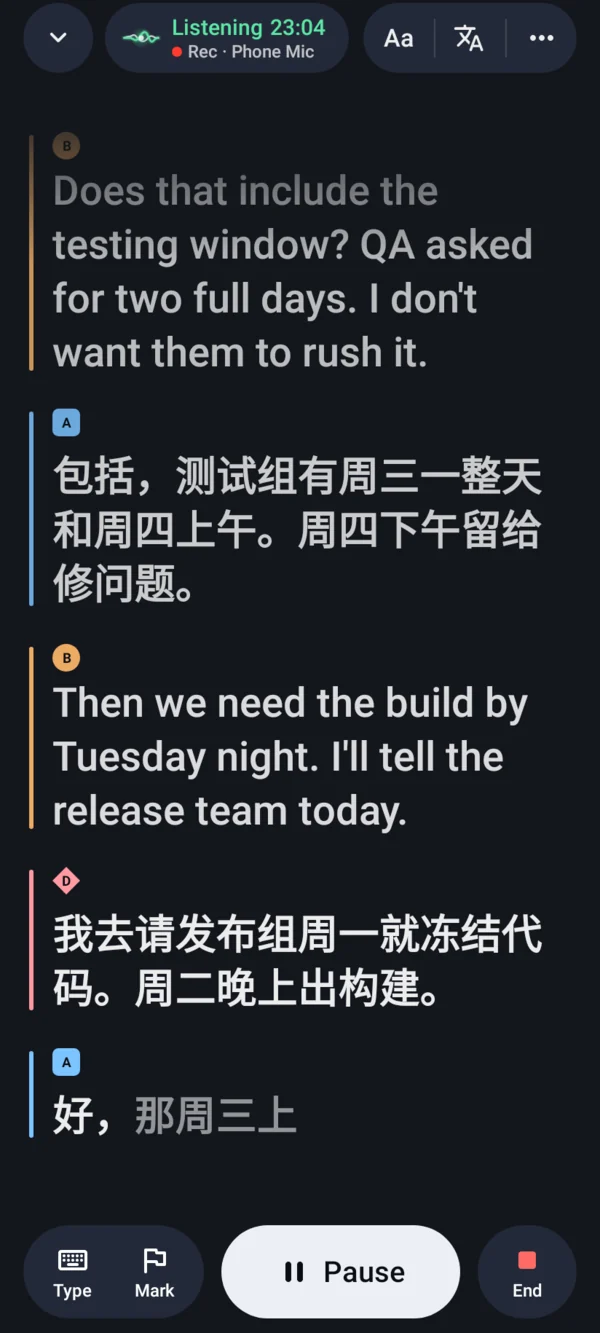
Both listen through your phone’s microphone to the people around you. Google’s Live Transcribe is on Google Play with no price, keeps working without a connection for languages you download, and transcribes in “over 80 languages and dialects”; its help page names no translation between spoken languages. Tingdong for Android shows each line in the original and in your language, in 60 languages, interprets face-to-face conversations in turns, and saves every session on your phone. It needs an internet connection and, after the free trial, a plan through Google Play. Google’s facts below are from its help page and its Google Play listing, read 24 October 2026.
Updated 2026-10-24
| Google Live Transcribe | Tingdong for Android | |
|---|---|---|
| What it shows | What people around you say, as text in the language they speak, and labels for other sounds | What people around you say, in the original and in your language, each speaker in their own color |
| Translation between spoken languages | Not stated on their site. The help page names one translation feature: sign-to-text, “American Sign Language (ASL) into English text” | 60 languages, into the language you choose; Conversation reads your words aloud in the other person’s language |
| Languages | “Over 80 languages and dialects” (Google Play listing) | 60 languages, for recognition and translation |
| Without internet | Works for downloaded languages: several on select Android devices and all Pixel phones on Android 12 or later | Does not work: needs mobile data or Wi-Fi |
| Typing | “Type responses in your conversation.” | In Conversation, “Hand over” lets the other person answer with one tap or by typing |
| Saved transcripts | Off by default; when turned on, kept for 3 days, then deleted; you can copy them or export what is stored | Every session saved on your phone; search, share, or export as TXT, Markdown, SRT or VTT |
| Requirements | Android 12 and up (Google Play listing); already installed on Pixel and select other Android phones | Android 12 or later, on phones, tablets and foldables |
| Price | Listed on Google Play with no price and no in-app purchases; the help page states no price | Free trial, no account or card; then a plan through Google Play |
Where a row says on the phone or without a connection, that is Google’s or Samsung’s feature: Tingdong runs recognition and translation on a streaming speech service, not on your phone, so it needs an internet connection. Why we made that trade is on one page: why not on the device, and why it costs money.
Which one should you use?
Pick Live Transcribe if everyone speaks your language and you only want their words written down, if you need captions without an internet connection, or if you want something with no price that may already be on your phone. Pick Tingdong if the people around you speak a language you don’t follow and you want it translated while they talk, at a meeting, a lecture or a talk, or if you want to keep transcripts longer than three days. More on Tingdong for Android.
Sources
The facts about Google’s and Samsung’s features come from these pages, read 24 October 2026: Google: Use Live Transcribe; Google Play: Live Transcribe & Notification (updated 2026-10-21); Google: Live Caption: Caption media & calls on your device; Samsung US: Use Live Caption and Live Transcribe on your Galaxy device.
Frequently asked questions
Can Live Transcribe translate in real time?
Not between spoken languages, as far as Google’s own pages say. Its help page names one translation feature, sign-to-text, which turns “American Sign Language (ASL) into English text”, and its Google Play listing describes transcription in “over 80 languages and dialects”, not translation (both read 24 October 2026). To see speech translated as people talk, use an app that translates, such as Tingdong, which shows each line in the original and in your language.
What’s the difference between Live Caption and Live Transcribe?
Live Caption captions sound that plays on your phone; Live Transcribe captions people speaking around it, through the microphone. Google says Live Caption works on “media like videos, podcasts, phone calls, video calls, and audio messages” and processes captions on the phone, and that Live Transcribe lets you “capture speech and sound and see them as text on your screen”. Samsung’s help page draws the same line: Live Caption “automatically detects audio streams from your phone”, Live Transcribe gives “a transcript of conversations taking place around the phone”. Tingdong for Android listens the way Live Transcribe does, through the microphone, and also translates. Live Caption vs Tingdong.
Is Google Live Transcribe free?
Google Play lists it with no price and no in-app purchases (read 24 October 2026), and Google says it is already installed on Pixel and select other Android phones. Its help page states no price. Tingdong has a free trial with no account or card; after that you choose a plan in the app, paid through Google Play.
Is there a way to translate live captions?
Yes, depending on where the sound comes from. For sound playing on your phone, Google says Live Caption can translate captions with Live Translate, which is “only available on Pixel 6+ devices”. For people talking around you, Tingdong for Android shows live captions translated into your language, in 60 languages, while they speak; it needs an internet connection.
Does Tingdong work offline like Live Transcribe?
No. Without an internet connection, Tingdong does not caption or translate. Live Transcribe keeps working for the languages you have downloaded, so it is the one to use where there is no connection.
Try it on your Android phone
Free trial · No account or card · Android 12 or later
On a Mac or a Windows PC? Tingdong for Mac and Windows captions what your computer plays, and on the Mac, your calls.