Tingdong for Android
Samsung Interpreter and Live Translate vs Tingdong
On a supported Galaxy phone, Samsung’s Interpreter works without a connection. Tingdong needs one, and runs on any phone with Android 12 or later, in 60 languages.

Free trial · No account or card
Needs an internet connection · Android 12 or later
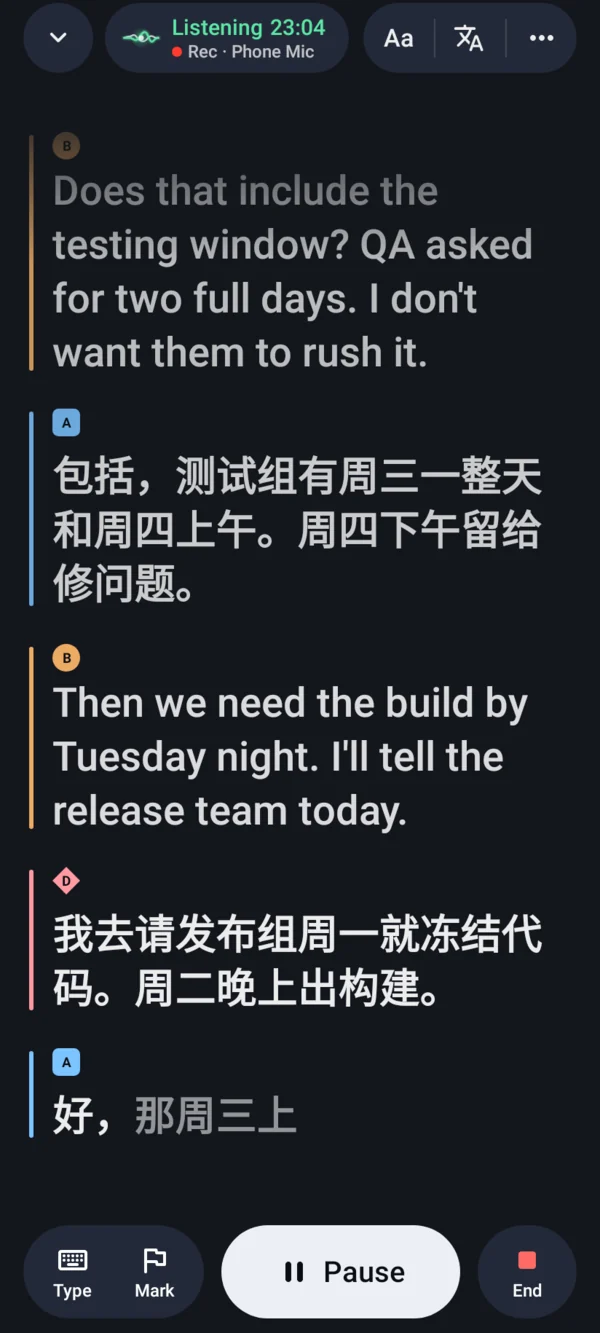
Interpreter and Live Translate are Galaxy AI features on selected Galaxy phones and tablets with One UI 6.1 or later. Samsung says Interpreter translates “face-to-face conversations without Wi-Fi or data”, and Live Translate translates phone calls. Tingdong for Android is an app from Google Play: it interprets face-to-face conversations in turns, shows live captions of a lecture or a meeting in the original and in your language, and saves every session on your phone. It can’t translate phone calls, and it needs an internet connection. Samsung’s facts are from its own pages, read 24 October 2026; each page’s date is in the table.
Updated 2026-10-24
| Samsung Interpreter and Live Translate | Tingdong for Android | |
|---|---|---|
| Phones | Selected Galaxy phones and tablets with One UI 6.1 or later (Samsung Gulf, updated 2026-07-01) | Any phone, tablet or foldable with Android 12 or later, Galaxy included |
| Face-to-face conversation | Interpreter’s Conversation mode: “two microphone icons … one for each of the languages being translated”; text-only or spoken translations | Tap “I speak”, then “I’m done”: your words read aloud in the other person’s language; “They speak” or “Hand over” for the answer |
| Long speech: a lecture, a tour | Interpreter’s Listening mode: one microphone icon at the bottom of the screen | Live captions in the original and in your language, each speaker in their own color, while you use other apps or the screen is off |
| Languages | Galaxy AI “supports 24 languages” after the update Samsung announced on 2026-10-14, the new ones “to follow in the coming weeks”; in Interpreter, English and Spanish preinstalled, others a free download | 60 languages, for recognition and translation |
| Without internet | Interpreter: “without Wi-Fi or data” | Does not work: needs mobile data or Wi-Fi |
| Phone calls | Live Translate: “translate phone calls in real time” | No: it can’t translate or caption phone calls |
| History | “Translations are discarded after 24 hours.” (Samsung Latin America, updated 2025-07-26) | Every session saved on your phone; export as TXT, Markdown, SRT or VTT |
| Price | “Galaxy AI basic features provided by Samsung are free”; whether Interpreter is a basic feature is not stated on the pages we read | Free trial, no account or card; then a plan through Google Play |
Where a row says on the phone or without a connection, that is Google’s or Samsung’s feature: Tingdong runs recognition and translation on a streaming speech service, not on your phone, so it needs an internet connection. Why we made that trade is on one page: why not on the device, and why it costs money.
Which one should you use?
Pick Samsung Interpreter if you have a supported Galaxy phone, both languages are on its list, and you need it to work without a connection, on a plane or abroad without data. Pick Live Translate if the conversation is a phone call; Tingdong can’t translate calls. Pick Tingdong if your phone is not a supported Galaxy, if you need one of Tingdong’s 60 languages that Samsung’s list does not include, or if you want live captions of a lecture or a meeting saved as a transcript you can export. More on Tingdong for Android and on using your phone as a translator.
Sources
The facts about Google’s and Samsung’s features come from these pages, read 24 October 2026: Samsung Gulf: Galaxy AI languages & usage guide (updated 2026-07-01); Samsung US: Call assist: Live translate calls on your Galaxy phone; Samsung Newsroom: Samsung Expands Language Support Across AI Experiences on Galaxy (published 2026-10-14); Samsung Hong Kong: Galaxy AI; Samsung Latin America: How to set up and use the Interpreter app on Galaxy devices (updated 2025-07-26).
Frequently asked questions
Is Samsung Interpreter free?
Samsung’s US page says “Galaxy AI basic features provided by Samsung are free” and that enhanced and third-party AI features “may be subject to fees”; the pages we read (24 October 2026) do not say which group Interpreter is in. Interpreter’s extra languages are a free download. Tingdong has a free trial with no account or card, then a plan through Google Play.
Does Samsung Interpreter work offline?
Yes, on supported Galaxy phones: Samsung says Interpreter translates “face-to-face conversations without Wi-Fi or data”. Tingdong does not; it needs an internet connection.
How many languages does Samsung Interpreter support?
Samsung’s announcement of 14 October 2026 adds Hungarian and Malay to Interpreter and says Galaxy AI “supports 24 languages”, the new ones arriving “in the coming weeks”. Tingdong for Android has 60 languages.
Does Tingdong work on Galaxy phones?
Yes. Tingdong for Android runs on any phone, tablet or foldable with Android 12 or later, Galaxy included, and installs from Google Play. It does not need Galaxy AI.
Can Tingdong translate phone calls like Live Translate?
No. Tingdong for Android does not translate or caption phone calls, and an incoming call interrupts the session. For calls on a supported Galaxy phone, use Live Translate.
Try it on your Android phone
Free trial · No account or card · Android 12 or later
On a Mac or a Windows PC? Tingdong for Mac and Windows captions what your computer plays, and on the Mac, your calls.