Tingdong for Android
Use your phone as a translator: Conversation in Tingdong
You speak, your phone says it in their language. It needs an internet connection: a dedicated translator device can work offline, Tingdong can’t.

Free trial · No account or card
Needs an internet connection · Android 12 or later
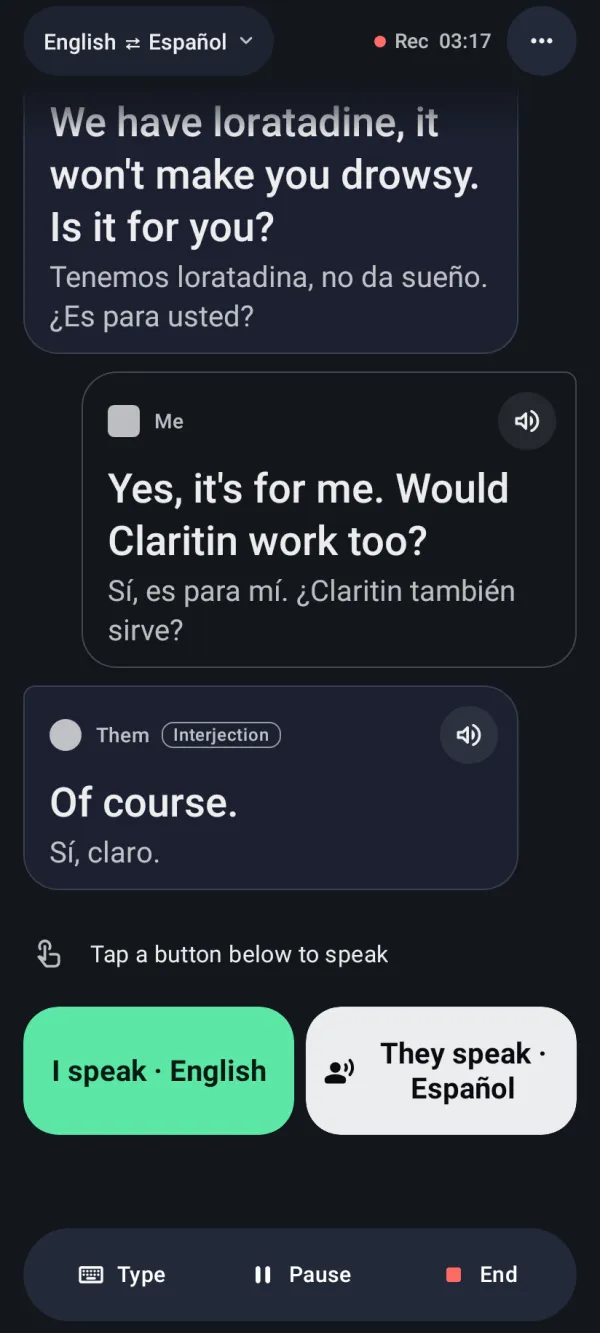
Looking at translator devices for a trip, a client visit or a talk with a neighbour? Tingdong’s Conversation does the same job on the Android phone you already carry: you speak, it reads your words aloud in the other person’s language, and their answer appears in yours, in turns, in 60 languages. For longer speech, such as a lecture, a guided tour or a meeting, live captions show the original and your language while people are still talking.
Updated 2026-10-24
How to set it up
- 1Install Tingdong from Google Play
It runs on Android 12 or later, on phones, tablets and foldables. There is no account to create, and the free trial needs no card.
- 2Tap “I speak”, talk, then tap “I’m done”
Tingdong reads your words aloud in the other person’s language. If you would rather say it yourself, it can also show you how to pronounce the translation.
- 3Let them answer: “They speak” or “Hand over”
Tap “They speak” and their answer appears in your language. Or tap “Hand over” and give them the phone: they can answer with one tap or by typing.
Live captions for longer speech
Conversation works in short turns. When one person talks for a long time, at a lecture, on a guided tour or in a meeting, use live captions instead: put the phone on the table, and what people say appears in the original and in your language, line by line, each speaker in their own color. Captions keep running when you switch apps or turn the screen off, and each session is saved on your phone as a transcript you can search and export. More on the Tingdong for Android page and in live translation for lectures.
Pick a dedicated translator device if …
Pick a dedicated translator device if you need translation where there is no internet: on a plane, far from a mobile network, or abroad without data or Wi-Fi. Tingdong shows nothing without a connection. A device also makes sense if you would rather not hand your own phone to a stranger, or if you want one physical button in a loud place. Pick Tingdong if you already carry an Android phone, want to try it free before you pay, and also want live captions and saved transcripts for lectures and meetings.
What you need
Android 12 or later, on a phone, tablet or foldable, and an internet connection (mobile data or Wi-Fi) while Tingdong listens: recognition and translation run on a streaming speech service, not on the phone. It listens through the microphone to the people around you; it can’t translate phone calls. Live audio goes from your phone to a third-party speech recognition provider (in the United States) and does not pass through our server. Transcripts stay on your phone.
Frequently asked questions
Are translator devices worth it?
Yes, if you need translation without an internet connection, or you would rather not hand your own phone to a stranger. If you already carry an Android phone with mobile data or Wi-Fi, an app like Tingdong does the same job in turns, and you can try it free first.
Is there a device that translates someone talking in real time?
Yes. Dedicated translator devices do, and so does a phone. Tingdong for Android shows live captions in your language while the person is still talking, and Conversation interprets in turns: it reads your words aloud in their language and shows their answer in yours.
What can translate without the internet?
Look for a dedicated translator device or app that says it works offline. Tingdong does not: without an internet connection it does not interpret or caption, so if you will be somewhere without a connection, that is the reason to pick a device.
How many languages does it interpret?
60 languages, for both recognition and translation. Each side speaks their own language: Tingdong reads yours aloud in theirs and shows theirs in yours.
Can the other person answer without touching my phone?
Yes: tap “They speak”, and Tingdong listens to their answer and shows it in your language. If they would rather use the phone, tap “Hand over”: they can answer with one tap or by typing.
Can it translate phone calls?
No. Tingdong for Android listens through the microphone to people near you. It can’t caption or translate phone calls, and an incoming call interrupts the session.
Is it free?
Download it free and try it with free credits, with no account or card. After that you choose a plan or credits in the app, through Google Play; the app shows the price before you pay.
Try Conversation on your phone
Free trial · No account or card · Android 12 or later
On a Mac or a Windows PC? Tingdong for Mac and Windows captions what your computer plays, and on the Mac, your calls.