Tingdong for Android
Live captions and real-time translation, on Android
Words appear while people are still talking.

Free trial · No account or card
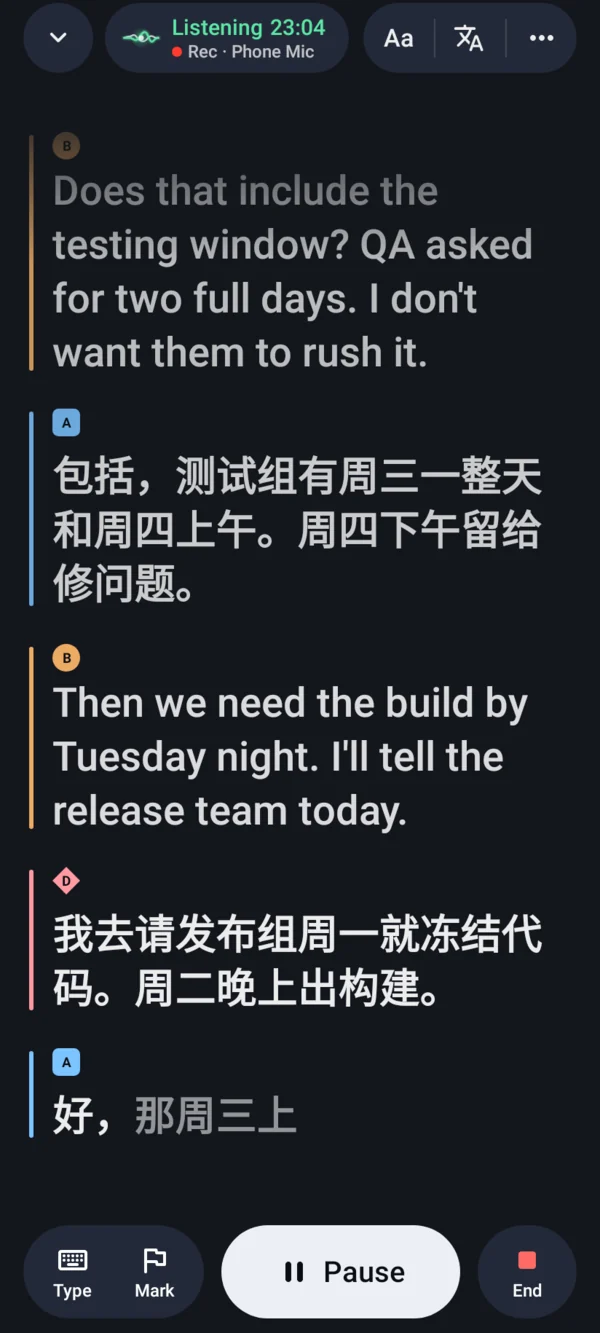
Put your phone on the table in a meeting, a lecture or a conversation, and what people say becomes live captions, in the original and in your language. Conversation interprets for two people in turns and reads your words aloud in theirs. Every session is saved on your phone as a transcript you can search and export.
Updated 2026-10-23
Live captions for meetings and lectures
Tap Start and Tingdong listens through your phone’s microphone. Each speaker gets their own color, so you can follow who said what. Captions keep running when you switch apps or turn the screen off: a notification shows the session with Pause, Resume and End, picture-in-picture keeps the newest lines above other apps, and a Quick Settings tile starts captions in one tap.
Translation, line by line
When someone speaks another language, turn on translation and read the original and your language together, line by line, in 60+ languages. Big text fills the screen when you want the person in front of you to read along.
Conversation, interpreted in turns
Tap “I speak”, talk, then tap “I’m done”: Tingdong reads your words aloud in the other person’s language. Tap “They speak” and their answer appears in yours, or tap “Hand over” so they can answer with one tap or by typing. Tingdong can also show you how to pronounce the translation.
Every session, saved as a transcript
Each session is saved on your phone as a transcript you can search, copy and share, or export as TXT, Markdown, SRT or VTT. Keep a session’s recording too and play it back from any line: Tingdong asks when a session ends, or you choose Always or Never in Settings. Transcripts and recordings are saved on your phone.
Price and free trial
Download free and start with free credits, with no account or card; the free credits never turn into a paid plan by themselves. After that, choose Standard (1,000 credits a month) or Pro (5,000 credits a month). A credit is about one minute of captions or translation, and members can add credit packs that never expire. The app shows the price before you pay.
Tingdong for Mac and Windows and Tingdong for iPhone and iPad are separate purchases.
Frequently asked questions
Which phones does it work on?
Android 12 or later, on phones, tablets and foldables. Tingdong needs an internet connection while it listens: recognition and translation run on a streaming speech service, not on the phone. It listens through the microphone to the people around you; it can’t caption phone calls.
Do I need an account?
No. There’s no sign-up and no sign-in, and the free credits need no card. When you want more, you buy a plan or credits in the app, through Google Play.
Who hears my audio? Where are my transcripts?
While captions run, live audio goes from your phone to a third-party speech recognition provider (in the United States) to make the captions and translations; it does not pass through our server. Transcripts and recordings stay on your phone. “Delete My Data” in Settings deletes everything on the phone and your usage records on our server. Details: privacy policy.
Try it at your next meeting or lecture
Free trial · No account or card · Android 12 or later
On a Mac or a Windows PC? Tingdong for Mac and Windows captions what your computer plays, and on the Mac, your calls.