AI note takers compared: 10 tools, bot or no bot
Updated 2026-11-17
Ten AI note takers, each checked against its maker’s own pages. Short answer: which AI note taker to pick depends on where your meetings happen and in what language. An English-speaking team that meets in Zoom, Teams or Google Meet and wants notes in its CRM should look at Fireflies.ai, Otter.ai or Fathom, which send a bot into the meeting to take notes. If a bot in the participant list is a problem, Granola and JotMe hear the meeting on your own computer, and Otter, Fireflies and tl;dv have desktop apps that do the same. For meetings around a table, record on a phone: Otter, Granola, Fireflies, Notta and Plaud all do it, and Tingdong does it on iPhone, iPad and Apple Watch. If the meeting is not in your language, or moves between languages, you need live translation during the meeting: JotMe, Notta, Zoom’s paid add-on and Tingdong have it. We make Tingdong, so read this page as a map: every fact about the others comes from their own pages, read on 5 November 2026, and the verdict names the cases where another tool is the better pick.
The ten at a glance
| Tool | Platforms | How it hears an online meeting | Records in-person meetings | Live translation during the meeting | Languages | Free plan | Starting paid price |
|---|---|---|---|---|---|---|---|
| Tingdong | iPhone, iPad and Apple Watch; Android; Mac and Windows | No bot: on a Mac or Windows PC it hears the meeting’s sound, shows live captions and translation, and writes notes for sessions of 5 minutes or more | Yes: iPhone and iPad record even with the screen locked, captions on or off, and label up to 15 speakers per recording; on Apple Watch, one tap starts recording; Android records too (version 1.2) | Yes: live captions, translated into any of 60+ languages | 60+, detected automatically; speakers labeled in recordings | Free trial with no sign-up or card (on a Mac or PC, about 60 minutes of subtitles) | Mac and Windows: $6.99 a month for live captions; iPhone, iPad and Android: plans in the App Store and Google Play |
| Otter.ai | Mac and Windows desktop app, iOS, Android, Chrome extension | Both: a bot joins Zoom, Teams and Google Meet, or the desktop app records without one | Yes, from the phone app | Not stated (live transcription only) | 6: English, Spanish, French, German, Japanese, Chinese | 300 transcription minutes a month | Pro $8.33 a month billed yearly ($16.99 monthly) |
| Granola | Mac, Windows, iOS, Android, Apple Watch | No bot: the desktop app hears the meeting audio on your computer | Yes, with the iPhone or Android app | Not stated | 31 for transcription on desktop, 17 on mobile | Basic, $0, with 30 days of meeting history | Business $14 per user a month (billing period not stated) |
| Fireflies.ai | Mac and Windows desktop app, iOS, Android, Chrome extension | Both: a bot joins calendar meetings, or it records without one on Mac and Windows | Yes, with the mobile app | Not stated | 100+ for transcription | Free forever: limited AI summaries, 400 minutes of storage per team | Pro $10 per seat a month billed yearly |
| Notta | Web, iOS, Android, Chrome extension; Mac and Windows desktop app (beta) | Both: a bot, or the desktop app captures your device’s audio and nothing joins (beta) | Yes: the mobile app, or Notta Memo, its pocket recorder | Yes; the free plan allows 2 uses a month (4 bilingual) | 58 | 120 transcription minutes a month, up to 3 minutes per conversation | Pro $8.17 a month billed yearly ($97.99 a year) |
| Plaud | Plaud recorders, phone app, web; Windows and Mac desktop app (beta) | No bot: the desktop app captures audio from your computer | Yes, with a Plaud recorder (from $159) | Not stated | 112 for transcription | Starter: 300 transcription minutes a month | Pro $17.99 a month or $99.99 a year; recorders from $159 |
| tl;dv | Mac and Windows desktop app, iOS, Android | Both: with or without a bot in Zoom, Google Meet and Teams; the desktop app records system audio | Not stated | Not stated; it translates transcripts and summaries | 30+ | Unlimited recordings and transcription; AI notes for 10 meetings | Pro $18 per seat a month billed yearly |
| Fathom | iOS app; bot-free capture on Mac (beta); Windows and Android not stated | Both: a bot, or bot-free capture (beta, Mac) | Not stated | Not stated | Not stated | Free forever: unlimited recordings, transcription and call summaries | Premium $16 a month billed yearly ($20 monthly) |
| JotMe | Mac, Windows, iOS, Android, Chrome extension | No bot: it doesn’t join or appear in the participant list | Yes: it translates face-to-face conversations live through the microphone | Yes: translated captions beside your meeting app | 104 spoken (145 in premium); translates into 209 | 20 minutes of live translation, 50 of transcription | Pro $10 a month billed yearly ($120 a year) |
| Zoom (ZoomMate) | Zoom desktop app (Windows, Mac, Linux, version 7.0.5 or later); My Notes also on mobile | Built into Zoom meetings; for Teams, Meet and in person, how it listens is not stated | Yes (My Notes) | Yes, as an add-on: live audio translation and translated captions, $5 a month | 33 for meeting summaries (our count of Zoom’s list) | Basic: summaries for 3 hosted meetings a month; My Notes 3 times a month | Workplace Pro $14.16 per user a month billed yearly |
Where a row says on-device or offline: Tingdong runs recognition and translation on a dedicated streaming engine, not on your Mac. Why that is the trade we chose — model size, 60+ auto-detected languages, simultaneous pacing — is on one page: why not on-device, and why it costs money.
Which one is for you?
An English-speaking sales or customer team in Zoom, Teams or Meet that wants notes in its CRM: Fireflies.ai, Otter.ai or Fathom — a bot joins the meeting to take notes, and all three list CRM integrations. No bot in the call: Granola, which hears the meeting on your computer and also records in person on the phone, or JotMe. Most meetings around a table and you’d rather not use your phone: Plaud or Notta Memo, both pocket recorders. Everyone already meets in Zoom: Zoom’s own notes, free for 3 hosted meetings a month on Basic. A free plan with unlimited recordings: Fathom or tl;dv. Tingdong is for meetings in more than one language, and for people who don’t want to create an account: it detects the spoken language automatically and labels speakers; on a Mac or Windows PC it captions and translates any meeting app live, with no bot and nothing for the host to do; on iPhone, iPad and Apple Watch it records the meeting in the room and turns it into notes. Our weaknesses, plainly: it needs an internet connection, it has no CRM or calendar integration, and it doesn’t join meetings by itself.
Bot or no bot: how each one hears an online meeting
A bot joins the call as a participant: the host and everyone else see it in the list, and some, such as Fireflies.ai, join meetings from your calendar on their own. Fireflies.ai, Otter.ai, Fathom, tl;dv and Notta can work this way, and most also offer a way without one. An app on your computer hears the meeting the way your speakers do, so nothing joins: Granola and JotMe work only this way, the desktop apps of Otter, Fireflies and tl;dv do too, and Notta’s and Plaud’s are in beta. Zoom’s notes come from its AI assistant, which Zoom’s product page now calls ZoomMate; it is built into Zoom meetings, and for other meeting apps the page doesn’t say how it listens. Tingdong on a Mac or Windows PC is the second kind: live translation for meetings puts captions on Zoom, Teams, Meet or any other app.
Tingdong on iPhone, iPad and Apple Watch: notes from the meeting in the room
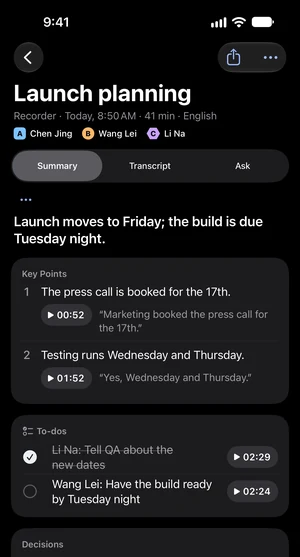
In Live, switch to Recorder and record, with captions on or off, even with the screen locked. Each recording labels up to 15 speakers, and the language is detected automatically. When you finish, the recording becomes a memory: a title, a summary, key points with their times, to-dos and decisions, and you can ask questions about it. On Apple Watch, one tap starts a recording; the iPhone organizes it. Your recordings, transcripts and notes are saved only on your device. Tingdong never stores your content or uses it for training. Your data belongs to you. More: Tingdong for iPhone and iPad.
On Android, version 1.2 records the same way, even with the phone locked; when you finish, you get a transcript with speakers, a summary and to-dos. More: Tingdong for Android.
Meeting notes on a Mac or Windows PC
Tingdong for Mac and Windows writes notes for every session of 5 minutes or more, online meetings included, with no bot in the call: a summary, key points, decisions and to-dos. Memories are searchable, you can ask about any one of them (“Ask about this memory”), and you can import an audio or video file. On a Mac, speakers are labeled when two or more people speak on the other end; on Windows, notes don’t label speakers.
On a Mac or Windows PC: live captions for any meeting app
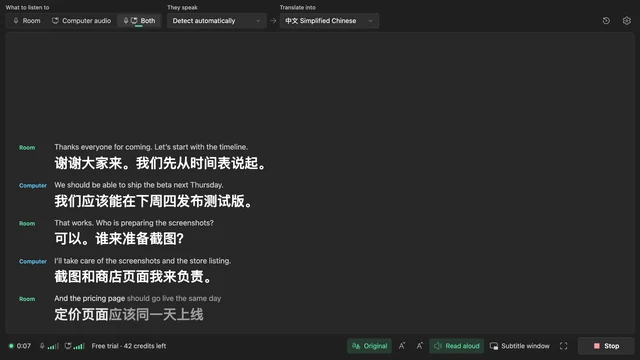
Tingdong for Mac and Windows hears the sound of the meeting app — Zoom, Teams, Google Meet or any other — and shows live captions and translation in a window beside it. No bot joins, and the host doesn’t have to do anything. The language is detected automatically, so a meeting that moves between languages stays readable. How it works in meetings · Tingdong for Windows
Sources
Every fact about another tool comes from its maker’s own pages, read on the date shown. Prices change and some vary by region; if something here is out of date, tell us at hi@tingdong.app.
Otter.ai (read 5 November 2026): otter.ai/pricing, otter.ai
Granola (read 8 November 2026): granola.ai/pricing, granola.ai, granola.ai/security, docs.granola.ai/…
Fireflies.ai (read 5 November 2026): fireflies.ai/pricing, fireflies.ai, guide.fireflies.ai
Notta (read 5 November 2026): notta.ai/en/pricing, notta.ai/en/features/bot-free, notta.ai/en
Plaud (read 5 November 2026): plaud.ai/pages/plaud-ai-plan-pricing, plaud.ai/pages/plaud-desktop, plaud.ai/pages/plaud-note-pro, plaud.ai/policies/privacy-policy
tl;dv (read 5 November 2026): tldv.io, tldv.io/app/pricing, intercom.help/…, tldv.io/features/languages
Fathom (read 5 November 2026): fathom.ai/pricing, fathom.ai
JotMe (read 5 November 2026): jotme.io/pricing, jotme.io, docs.jotme.io/product/languages, docs.jotme.io/…, jotme.io/policy
Zoom (ZoomMate) (read 5 November 2026): zoom.com/en/products/ai-assistant, zoom.us/pricing, support.zoom.com KB0078144, support.zoom.com KB0083738, support.zoom.com KB0085614
Frequently asked questions
Which AI note taker doesn’t send a bot into the meeting?
Granola and JotMe never join the meeting. Otter, Fireflies and tl;dv can record from their desktop apps instead of sending a bot; Notta’s and Plaud’s bot-free desktop apps are in beta, and so is Fathom’s bot-free capture on the Mac. Tingdong doesn’t join either: on a Mac or Windows PC it shows live captions and translation, and writes notes for sessions of 5 minutes or more.
Which AI note taker works for in-person meetings?
Otter, Granola, Fireflies and Notta record from their phone apps; Plaud and Notta also sell pocket recorders; JotMe translates face-to-face conversations through the microphone; and Zoom’s My Notes works in person. Tingdong records on iPhone and iPad even with the screen locked and labels up to 15 speakers per recording; on Apple Watch one tap starts a recording, and the iPhone turns it into notes.
Which AI meeting assistant translates during the meeting?
JotMe shows translated captions while you stay in your meeting app; Notta translates live (its free plan allows 2 uses a month, 4 bilingual); Zoom sells live translation as a $5-a-month add-on. Tingdong translates the sound of any meeting app on a Mac or Windows PC, and speech in the room on a phone, into 60+ languages, detecting the spoken language automatically. Otter, Granola, Fireflies, Plaud and Fathom don’t state live translation; tl;dv translates transcripts and summaries.
Is there a free AI note taker?
Fathom’s free plan has unlimited recordings, transcription and call summaries; tl;dv’s has unlimited recordings and transcription with AI notes for 10 meetings; Otter and Plaud give 300 transcription minutes a month, Notta 120 (up to 3 minutes per conversation); Granola’s Basic plan is $0 with 30 days of meeting history; Zoom Basic summarizes 3 hosted meetings a month. Tingdong has a free trial with no sign-up or card: on a Mac or PC, about 60 minutes of subtitles.
Which AI note taker syncs with a CRM like Salesforce or HubSpot?
Otter.ai connects to Salesforce and HubSpot on its Pro plan (within user limits), Fathom syncs CRM fields on its Business plan, Notta lists Salesforce and HubSpot on Business, Fireflies.ai names CRM among the places it works, and Plaud’s Salesforce integration is in preview. Tingdong has no CRM or calendar integration; if your notes have to land in a CRM, pick one of those.
Are my meeting recordings stored or used to train AI?
It depends on the tool. Granola trains on anonymized data unless a user opts out (off by default on Enterprise); JotMe says it doesn’t use customer data to train its models; Plaud says it trains only with your explicit consent given in advance. Tingdong: your recordings, transcripts and notes are saved only on your device. Tingdong never stores your content or uses it for training. Your data belongs to you. To turn speech into text, the audio goes to a third-party speech recognition service.
Try it on your next video, meeting or callTry it at your next meeting or lectureTry it at your next meeting or class
Download free for macOS Get it for Windows

Free trial: about 60 minutes of subtitles · No signup or card
Free trial · No account or card
Free trial · No account or card · One app for iPhone and iPad
Meetings and classes on iPhone or iPad? Tingdong for iPhone and iPad
Calls and videos on a Mac? Mac versions
Windows 11 (subtitles and Read aloud only, nothing sent into calls)