Live translation for Zoom meetings
Updated 2026-10-15
Take the call or meeting on your Mac, and what the other side says appears in your language as they speak. To follow a Zoom meeting in another language, run Tingdong on your Mac: it captures the meeting audio and shows live translated subtitles beside the Zoom window. No bot joins the call, nothing appears to other participants, and transcripts are saved only on your Mac. Works identically for Teams, Meet and FaceTime.
How to set it up
- 1Open Tingdong, pick “Live Subtitles”, source “Screen sound”
It hears exactly what the meeting plays — every speaker, every accent, even mid-meeting language switches.
- 2Press Start and join your meeting
Floating subtitles follow the conversation in your language. Position them next to the speaker grid.
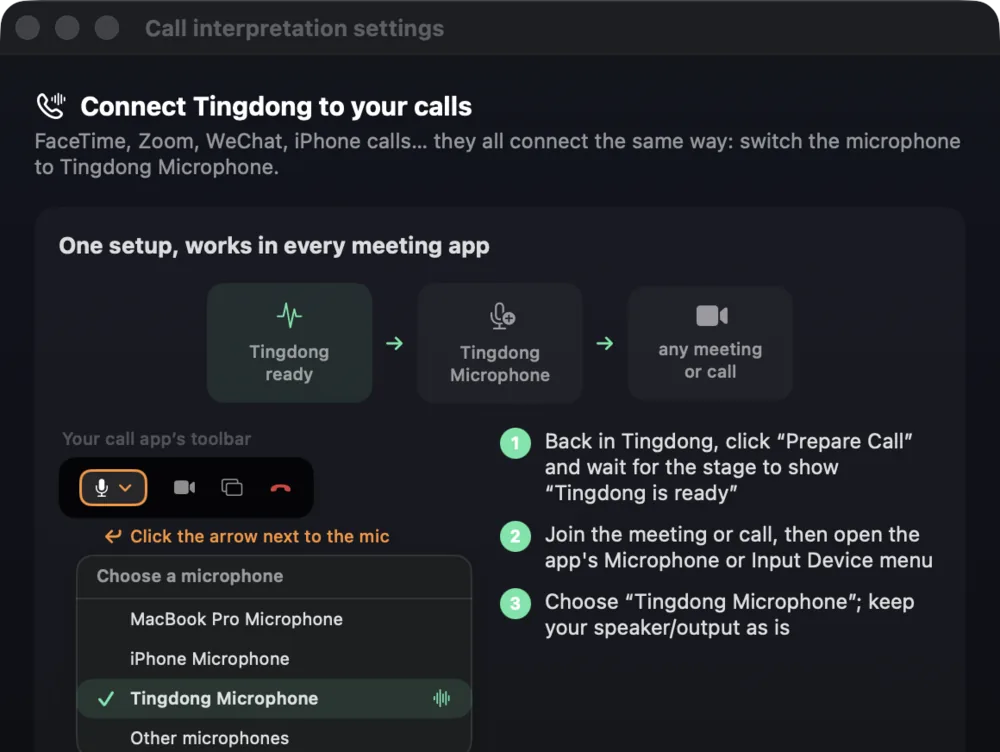
- 3Want to speak back in their language?
Switch to Call Translation and pick “Tingdong Microphone” in Zoom’s mic menu — your words reach the room as translated voice, both directions live. Sending your translated voice into a call or meeting through Tingdong Microphone needs the Website version for the Mac; the App Store version still subtitles what the other side says.
No bot in the participant list
Meeting-translation tools like Otter or notetaker bots join your call as a visible participant — awkward in client meetings, often banned in confidential ones. Tingdong listens on your Mac to the audio you already hear; recognition and translation run over the network, and transcripts are saved only on your Mac. Nobody sees an extra attendee, the audio is never stored, and billing counts seconds of audio, never content.
Zoom on a Windows PC
On a Windows PC, open Tingdong for Windows, choose “Computer audio” and press “Start Listening”: the Zoom meeting you are listening to appears in your language as live subtitles, in the main window or in a small window that stays on top of other apps. Nothing is sent into the call: answering in their language through Tingdong Microphone needs the Website version for the Mac. More on “Computer audio”: translating the audio playing on your PC.
Frequently asked questions
Do other participants see anything?
No. Tingdong is not a bot and never joins the meeting. It listens on your Mac to the audio you already hear; recognition and translation run over the network. The subtitles are visible only on your screen.
Does it work with Microsoft Teams and Google Meet?
Yes — on a Mac it captures system audio, so any meeting app works: Zoom, Teams, Meet, Webex, FaceTime, even a browser tab. One tool for all of them.
Can it translate what I say too?
Yes. Switch to Call Translation and select “Tingdong Microphone” as your mic inside Zoom. The other side hears your voice plus a translated voice; you read bilingual subtitles of their replies. (Tingdong Microphone and the translated voice: Mac Website version only.)
How much does an hour of meetings cost?
Subtitles are 1 credit/minute — an hour costs 60 credits.
Try it on your next video, meeting or call
Download free for macOS Get it for Windows
Free trial: about 100 minutes of subtitles · No signup or card
Windows 11 (subtitles and Read aloud only, nothing sent into calls)