Real-time translated subtitles for Netflix
Updated 2026-10-14
Press Start, play it, and the subtitles appear as it is spoken — original, translated or both. To watch Netflix in a language you don’t speak, run Tingdong on your Mac: it listens to the system audio and floats live translated subtitles over the video — any show, any language, no browser extension. Subtitles appear while the line is still being spoken, about half a breath behind.
How to set it up
- 1Open Tingdong and pick “Live Subtitles”
Choose “Screen sound” as the source so it hears exactly what Netflix plays — nothing from the room.
- 2Press Start
A floating subtitle window appears over Netflix (or any app). Original line on top, your language below.
- 3Optional: turn on Read aloud
Prefer to listen instead of read? The translation can be read aloud to you in your language.
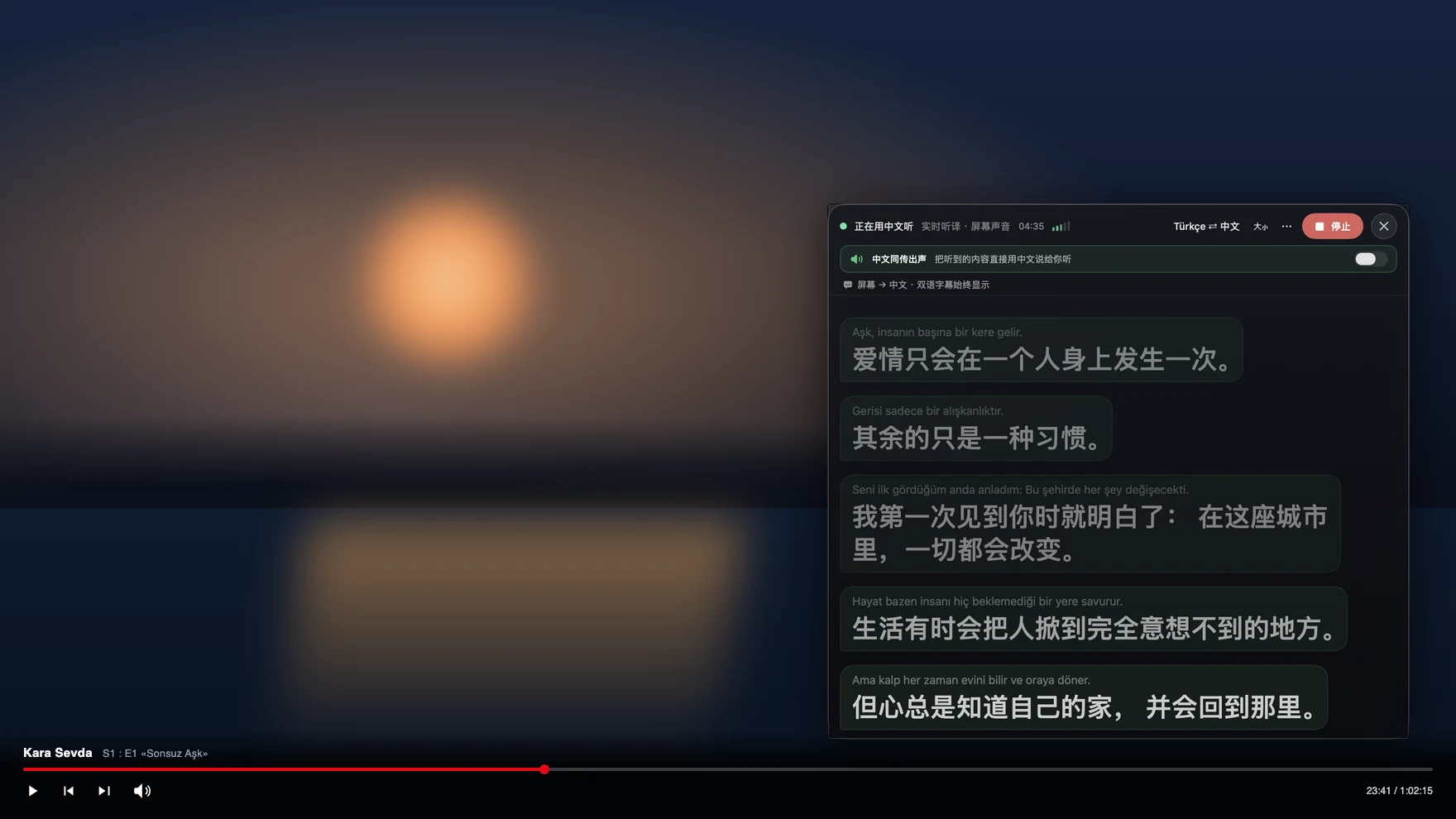
Why this works where screen tools fail
Netflix DRM blacks out screen recorders and screenshot tools — that’s why most “video translator” apps show a black rectangle. Tingdong never touches the picture: it captures the audio your Mac is already playing, so DRM never triggers. The same trick works for Disney+, YouTube, podcasts, local video files and online courses. There’s no bot and no video file to upload: Tingdong sends only the audio, live, for recognition; the audio is not stored, and transcripts stay on your Mac.
Frequently asked questions
Does it work with Netflix DRM?
Yes. Tingdong translates the audio stream, not the picture, so Netflix’s screen-capture protection is never triggered. The video keeps playing normally while subtitles float above it.
Which languages can it translate?
60+ input languages, auto-detected — you never tell it what the show speaks. Korean drama, Japanese anime, Spanish thriller, mid-episode language switches: it just follows, translating into your language.
Do I have to pay to watch a movie?
Not to find out whether it works for you: every new Mac gets a free trial of about 100 minutes of subtitles, with no signup and no card. After that, one membership covers most everyday watching, meetings and calls, and your remaining allowance is always visible inside the app.
Is there a delay?
Subtitles start appearing while the sentence is still being spoken and settle within a second or two — simultaneous-interpretation pacing, not “wait for the line to finish”.
Try it on your next video, meeting or call
Free trial: about 100 minutes of subtitles · No signup or card
This page is about the Mac. Windows PC? Tingdong for Windows