Real-time translation for FaceTime calls
Updated 2026-09-24
Take the call or meeting on your Mac, and what the other side says appears in your language as they speak. To translate a FaceTime call live, take the call on your Mac with Tingdong running: what they say becomes bilingual subtitles in real time, and with Call Translation on, what you say reaches them as a translated voice. It works in group FaceTime, auto-detects 60+ languages, and the people on the other side install nothing. Sending your translated voice into a call or meeting through Tingdong Microphone needs the Website version; the App Store version still subtitles what the other side says.
How to set it up
- 1Open Tingdong and pick “Call Translation”
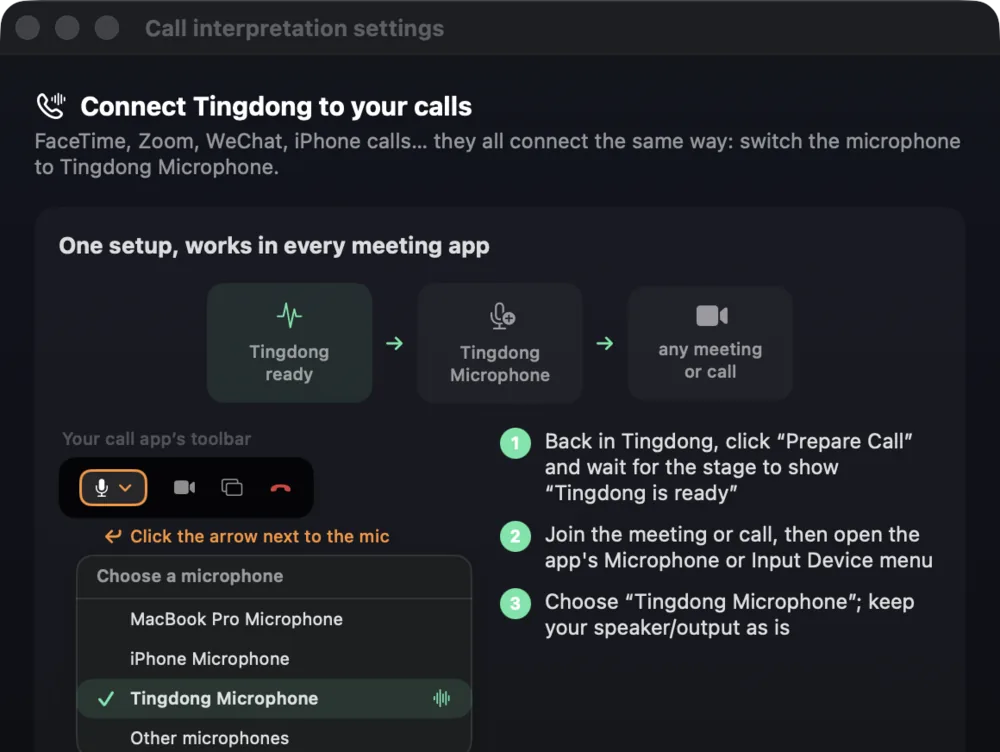
The app readies the Tingdong Microphone (Website version) and walks you through with pictures.
- 2In FaceTime, choose “Tingdong Microphone” (Website version) as your mic
That one menu choice is the whole setup — the same route works for Zoom, WhatsApp and WeChat calls.
- 3Talk
They hear your voice plus a translated voice; you read live bilingual subtitles of everything they say. Only reading along? Use “Live Subtitles” — it subtitles the call without touching your mic. (Tingdong Microphone and the translated voice: Website version only.)
Why most caption tools go silent on calls
FaceTime and phone-call audio is rendered by a windowless system process, not by a normal app window — so tools built on screen capture simply never hear it. Tingdong ships a dedicated system-audio tap built for calls, which is why the same app that subtitles YouTube also subtitles a live FaceTime conversation. Apple’s own Live Translation is the built-in alternative: free and on-device, but one-on-one calls only, a handful of languages, and captions rather than a translated voice.
Frequently asked questions
How is this different from Apple’s built-in Live Translation?
Apple’s Live Translation (iOS 26) is free and runs on-device — use it if it fits. It covers one-on-one calls on recent iPhones in about 10 languages, translating in turns. Tingdong covers group FaceTime, 60+ auto-detected languages, continuous simultaneous pacing, a translated voice in both directions, and the same app subtitles your meetings and videos. (Tingdong Microphone and the translated voice: Website version only.)
Does it work in group FaceTime calls?
Yes. Tingdong translates the call audio your Mac plays, so it doesn’t care how many people are on the call or which languages they switch between — every speaker gets subtitled and language switches are auto-detected mid-call.
Do the other people need anything?
Nothing. They FaceTime you normally and hear your original voice plus a translated voice. (Tingdong Microphone and the translated voice: Website version only.)
What about WhatsApp, WeChat or Zoom calls?
Same single route: pick “Tingdong Microphone” in the app’s mic menu. Any app where you can choose a microphone gets two-way live interpretation. (Tingdong Microphone and the translated voice: Website version only.)
Try it on your next video, meeting or callTry it at your next meeting or lecture

Free trial: about 100 minutes of subtitles · No signup or card
Free trial · No account or card
This page is about the Mac. Windows PC? Tingdong for Windows