How to translate a phone call in real time
Updated 2026-10-16
Take the call or meeting on your Mac, and what the other side says appears in your language as they speak. To live-translate a real phone call, hand the call from your iPhone to your Mac over Bluetooth and let Tingdong interpret: the other side hears your voice plus a translated voice, you read live bilingual subtitles of their replies — even if they switch languages mid-call. They install nothing. Sending your translated voice into a call or meeting through Tingdong Microphone needs the Website version; the App Store version still subtitles what the other side says.
How to set it up
- 1Pair once
On your iPhone: Settings → Bluetooth → connect to your Mac, like pairing headphones. One-time setup.
- 2Press “Prepare Call” in Tingdong
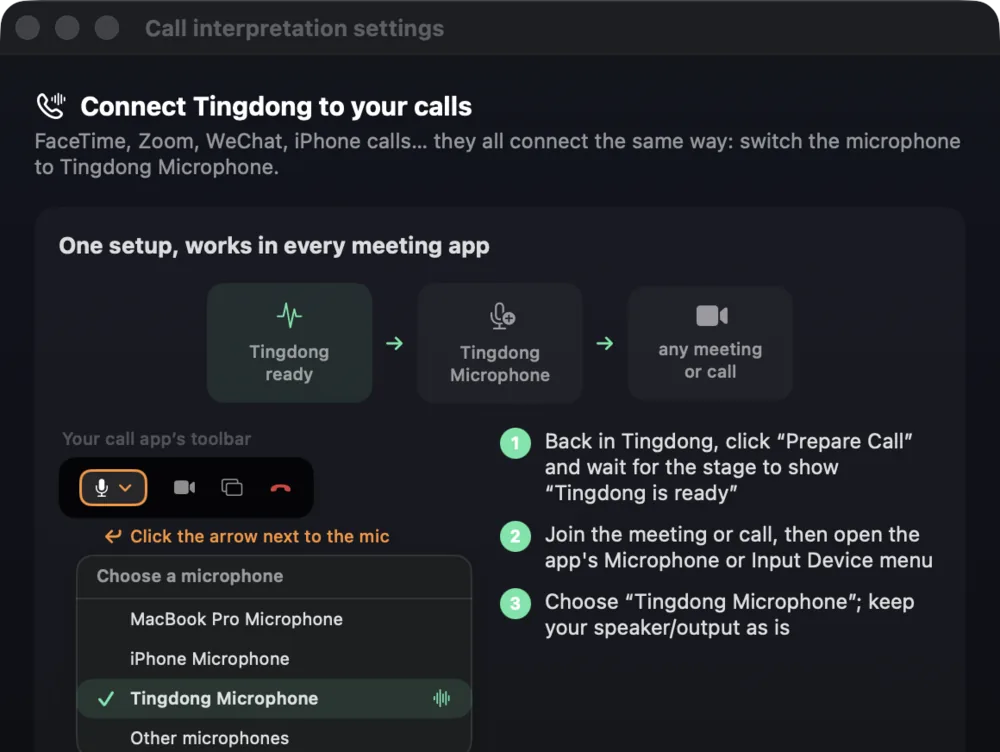
The app readies the Tingdong Microphone (Website version) and shows a step-by-step visual guide — nothing to memorize.
- 3Route the call to the Mac and talk
When the call connects, pick your Mac as audio output on the iPhone call screen. From then on both directions are interpreted live. (Tingdong Microphone and the translated voice: Website version only.)
Tingdong for iPhone and iPad, and why calls go through the Mac
Tingdong for iPhone and iPad is on the App Store and captions the people around you: meetings, classes, face-to-face conversations. What it can’t caption is a phone call: the iPhone doesn’t give third-party apps the sound of a call, so you hand the call to your Mac and Tingdong for Mac subtitles it there. Apple’s own Live Translation (iOS 26) works only on iPhone 15 Pro or newer, covers about 10 languages, and pauses for turn-taking. Routing the call to a Mac over Bluetooth is currently the only reliable way to get continuous, two-way Call Translation on a real call — with 60+ auto-detected languages and subtitles on a screen big enough to actually read. (Tingdong Microphone and the translated voice: Website version only.)
Frequently asked questions
Does the other person need to install anything?
Nothing. They just talk on a normal call and hear your original voice plus a translated voice track. (Tingdong Microphone and the translated voice: Website version only.)
Which calls does this work with?
Regular phone calls handed over from iPhone, plus FaceTime, WhatsApp, WeChat, Zoom and any app where you can choose a microphone. The route is always the same: pick “Tingdong Microphone”. (Tingdong Microphone and the translated voice: Website version only.)
How is this different from Apple’s iOS 26 Live Translation?
Apple’s is free and on-device, but needs an iPhone 15 Pro or newer, supports about 10 languages for calls, works only one-on-one, and translates in turns. Tingdong works with any iPhone that can pair Bluetooth, auto-detects 60+ languages, keeps simultaneous pacing, and also covers meetings and media. See the full comparison.
What does a translated call cost?
Subtitles are billed per side, 1 credit/minute each: translating both you and the other person is 2 credits/minute. Read aloud, which speaks their words to you in your language, is 8 credits/minute. Translated voice, which speaks your words into the call in their language, is also 8 credits/minute and is only in the Website version. Both are billed only while someone is actually speaking.
Try it on your next video, meeting or call
Free trial: about 100 minutes of subtitles · No signup or card
This page is about the Mac. Windows PC? Tingdong for Windows