Translate Zalo voice messages and calls

Updated 2026-09-15

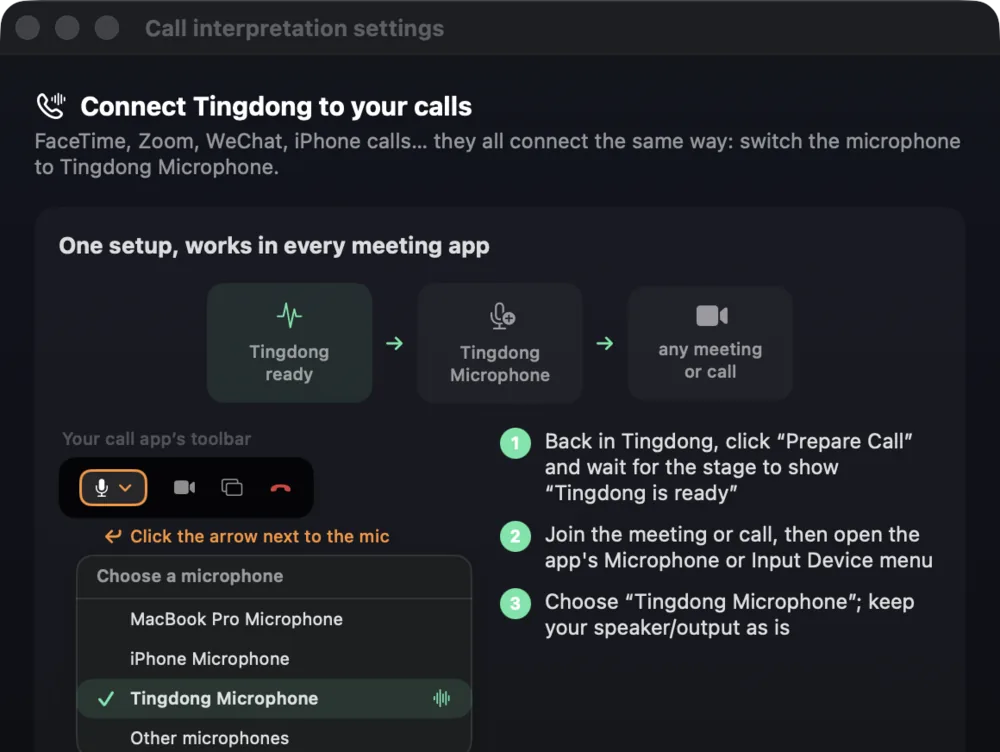
Pick Tingdong Microphone once, and every call is interpreted both ways as it happens. Zalo conversations lean heavily on voice messages, and a recording carries no text for a translator to work with — which is why the usual fallback is asking someone who speaks Vietnamese. On your Mac, Tingdong captions the voice message in your language while it plays, and for a call taken in the Zalo Mac app it interprets both directions: they hear your words as a Vietnamese voice, you read live captions of their replies.

60+languages, auto-detected
Simultaneoustranslation starts before the sentence ends
Any appon your Mac

How to set it up

  1. 1
    For voice messages: “Live Listen” with “Screen sound”

    Press Start in Tingdong, then play the voice message in the Zalo app on your Mac. Captions appear as it plays, Vietnamese on top, your language below.

  2. 2
    For calls: call from the Zalo Mac app

    Pick “Call Translation” in Tingdong, then choose “Tingdong Microphone” as the microphone in Zalo’s settings. That one choice is the whole setup.

  3. 3
    Talk, or only read

    They hear your voice plus a translated voice; you read bilingual captions of everything they say. “Live Listen” alone captions the call without touching your mic.

Translate Zalo voice messages and calls
The in-app walkthrough: one route for every call and meeting app.

Vietnamese tones, regional accents and fast speech

Vietnamese carries meaning in tone, and northern, central and southern speech differ enough that a listener from one region slows down for another — which is why short, isolated transcriptions of a voice message go wrong so often. Tingdong translates a continuous stream of speech and keeps context across sentences, and the original Vietnamese line stays on screen above the translation, so a name, a price or an address can be checked against what was actually said. The same route covers the work this app is used for: a long voice message from a supplier or a landlord, a call with a partner in Ho Chi Minh City, a group chat where several people record in a row, and any language switch into English is detected per phrase rather than set in advance.

Frequently asked questions

Can it translate a Zalo call on my phone?

Not directly — iOS does not let third-party apps reach call audio. Take the call in the Zalo Mac app and pick “Tingdong Microphone”, or hand a regular phone call to your Mac over Bluetooth.

Does it work on Zalo voice messages?

Yes, that is the most common use. With Live Listen running, press play and the message is captioned in your language while it plays, however long the recording is.

Do I have to select Vietnamese?

No. Vietnamese is auto-detected among 60+ input languages, per phrase, so a chat that mixes Vietnamese and English keeps captioning without any setting.

Does the other person need to install anything?

Nothing. They use Zalo normally and, during a call, hear your original voice alongside a translated voice. Everything else runs on your Mac.

Try it on your next video, meeting or call

Download free for macOS

100 trial credits on install · No signup, no credit card