Translate WeChat voice messages and calls
Updated 2026-09-24
Take the call or meeting on your Mac, and what the other side says appears in your language as they speak. WeChat’s own “convert to text” turns a voice message into Mandarin text, which is a transcript, not a translation — and a voice or video call has nothing at all. On your Mac, Tingdong captions a voice message in your language while it plays, and for a call taken in the WeChat Mac app it interprets both directions (Website version): they hear your words as a translated voice, you read live captions of everything they say.
How to set it up
- 1For voice messages: “Live Listen” with “Screen sound”
Start Tingdong, then press play on the voice message in the WeChat Mac app. Captions appear as it plays: the original line on top, your language below.
- 2For calls: take the call in the WeChat Mac app
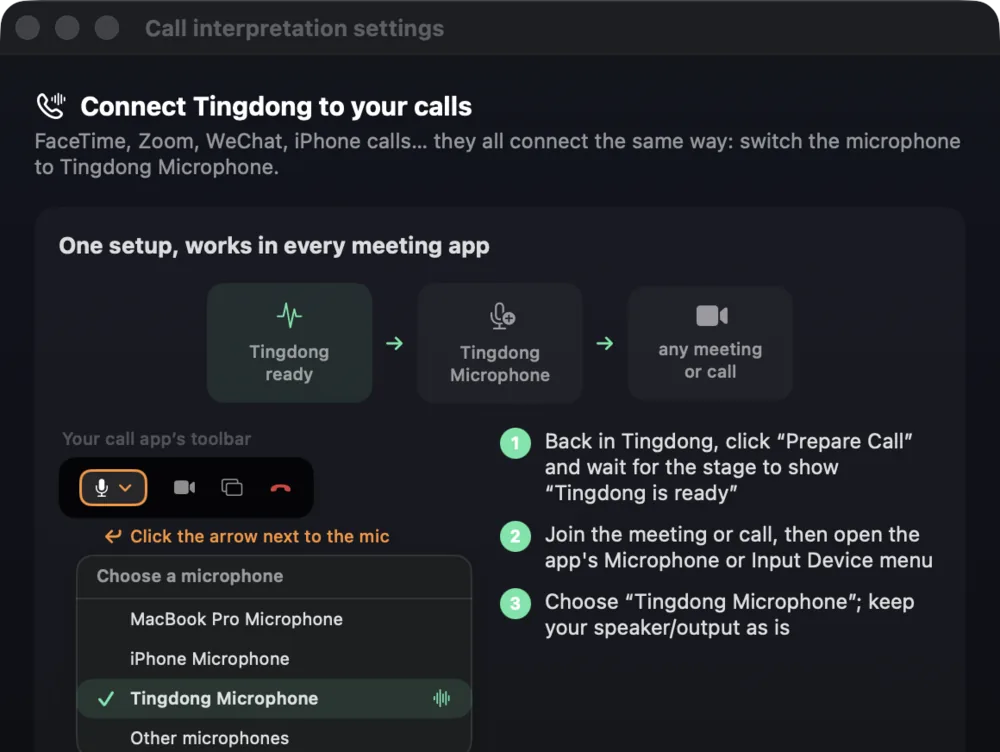
Pick “Call Translation” in Tingdong, then choose “Tingdong Microphone” (Website version) as the mic in WeChat’s settings. That single choice is the whole setup.
- 3Talk, or just read along
They hear your voice plus a translated voice (Website version); you read bilingual captions. If you only need to understand them, “Live Listen” captions the call without using your mic.
Supplier calls are where the stakes sit
Most people who need this are not chatting — they are checking a price, a quantity, a lead time or a shipping date with a factory, an agent or a partner, and a misheard number costs money. Two things help there. The original line stays on screen above the translation, so a figure or a product code can be checked against what was actually said. And the translation runs as a continuous stream with context across sentences rather than message by message, which is what keeps a long voice message — the kind that arrives as six recordings in a row — readable end to end. Language is detected per phrase among 60+ inputs, so a call that moves between Mandarin and English needs no setting change.
Frequently asked questions
Can it translate a WeChat call on my phone?
Not directly — iOS does not let any third-party app reach call audio. Take the call in the WeChat Mac app and pick “Tingdong Microphone” (Website version), or hand a regular phone call to your Mac over Bluetooth.
How is this different from WeChat’s “convert to text”?
That feature writes the voice message down in the language it was spoken in. Tingdong shows the original line and a live translation into your language as the message plays, and it also works during calls.
Does the supplier need to install anything?
Nothing. They use WeChat as usual. During a call with Call Translation on, they hear your original voice plus a translated voice (Website version).
Does it work for video calls and group calls?
Yes. It works from the call audio your Mac plays, so video calls and calls with several people are captioned the same way, with speakers switching language handled automatically.
Can I replay a voice message to check a number?
Yes. Captions are produced from the audio every time it plays, so replaying a message to re-read a price or a date works as often as you need.
Try it on your next video, meeting or callTry it at your next meeting or lecture
Download free for macOS Get it for Windows

Free trial: about 100 minutes of subtitles · No signup or card
Free trial · No account or card
Windows 11 (subtitles and Read aloud only, nothing sent into calls)