Streaming
System audio flows straight in; captions sit right under the picture
Real-time interpreter · macOS
The world speaks.
You understand.
Live translated captions and voice for anything you watch, every meeting you join, and even iPhone calls. 60+ languages are detected automatically. The other person installs nothing.
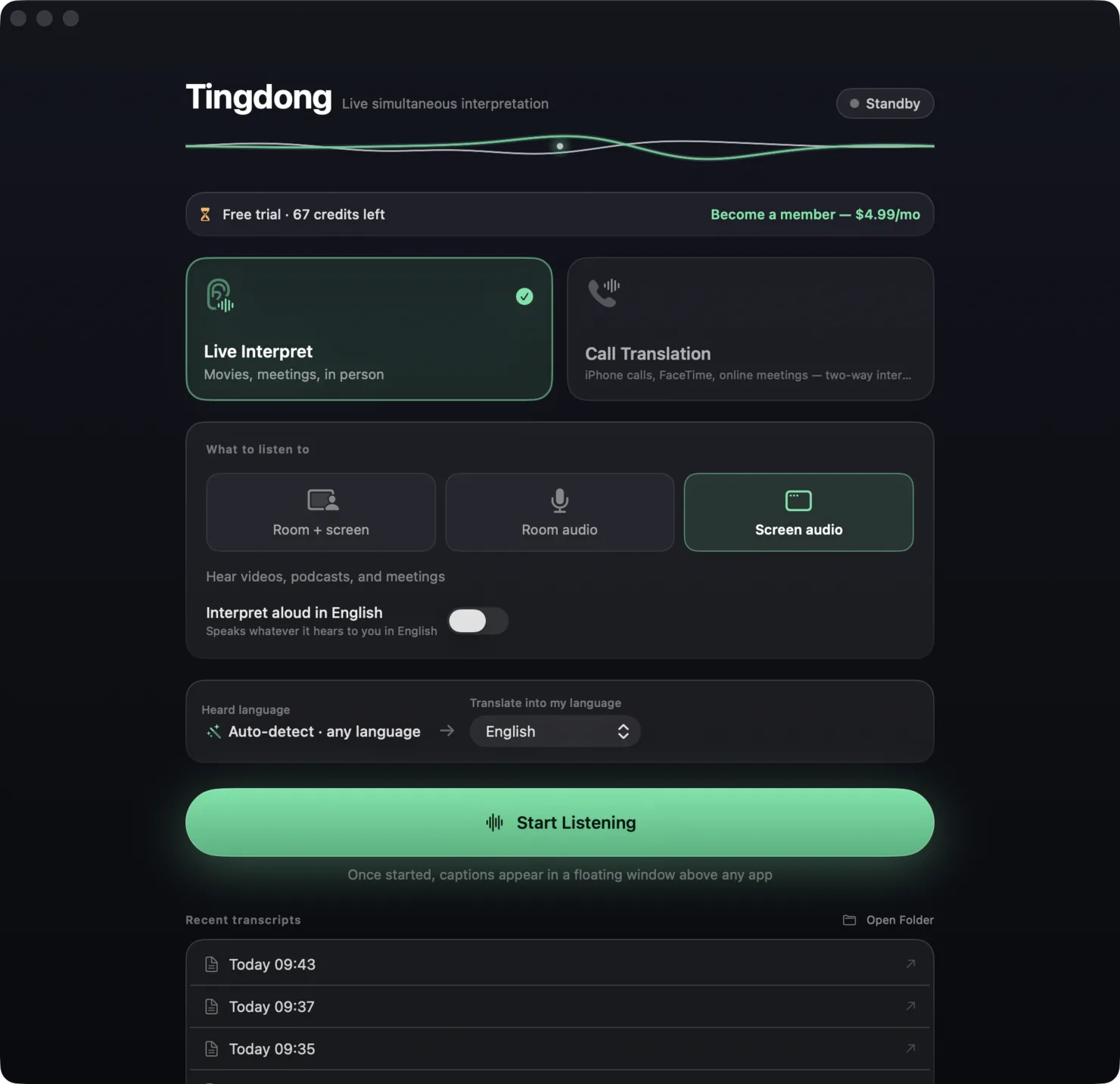
Aşk, insanın başına bir kere gelir.
Love happens to a person only once.
LIVE CAPTIONS
Videos, podcasts, online classes, meetings — system audio flows straight into Tingdong and live captions float on screen. English, Japanese, Spanish, mid-video switches — you never tell it what it’s hearing, it just knows. Read aloud when you want; a zero-chrome big-screen mode projects captions for the whole room.
System audio flows straight in; captions sit right under the picture
Meeting audio becomes live captions, so you never lose the thread
Hand the call to your Mac — two-way interpretation speaks for you
The mic hears both sides; the screen becomes shared captions
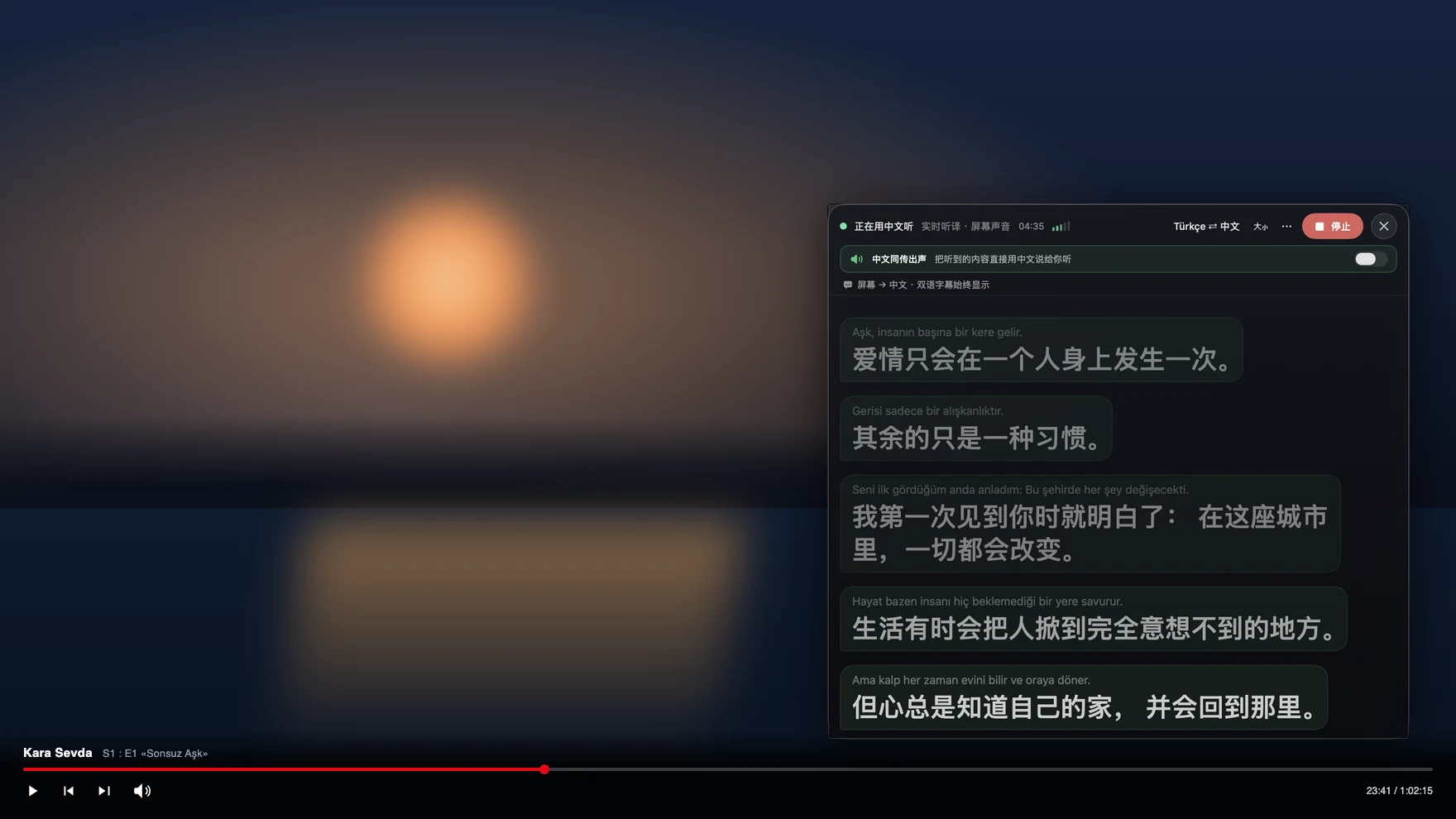
CALL TRANSLATION
An iPhone call handed to your Mac over Bluetooth, a Zoom meeting, a face-to-face chat — the Tingdong microphone takes over: what they say arrives in your language — even if they switch languages mid-call — and what you say reaches them in theirs. One switch decides who hears what.
金曜日に会議を動かせますか?
Can we move the meeting to Friday?No problem — see you Friday at 10 a.m.
問題ありません。金曜の午前10時に。
Tingdong can hear the room, your Mac, or both. For iPhone calls, pair the phone with your Mac once and follow the guide in the app.
An app that listens all day owes you hard privacy guarantees. Three promises, built into the product:
Your audio is never used to train any model. Not opt-out — the pipeline simply does not exist.
Audio only streams through the live recognition channel and is gone. Tingdong servers keep no recordings, ever.
Transcripts and translations live only on your Mac. Billing counts seconds — never what you watched or said.
Tingdong Membership
At $4.99 a month, one membership covers most everyday watching, meetings and calls. Live captions and call translation are both included.
Try it free on install, with no signup or card. Membership is designed for normal personal watching, meetings and calls; unusually heavy continuous streaming is subject to fair use.
Tingdong is a macOS app for real-time speech translation. It turns anything your Mac plays into live translated captions — YouTube, Netflix, Zoom, Teams and Meet meetings, podcasts, online courses — and interprets real iPhone phone calls in both directions once the call is handed to the Mac over Bluetooth. 60 input languages are detected automatically, spoken interpretation is built in, and every new Mac gets a free trial with no signup.
Three steps, then it works for every call: ① On your iPhone, go to Settings → Bluetooth and connect to your Mac (just like pairing headphones); ② Open Tingdong on the Mac, choose “Call Translation” and press “Prepare Call”; ③ Once the call connects, switch the audio output to your Mac on the iPhone’s call screen. From then on their words become live captions in your language (and can be read aloud to you), while your replies are spoken to them as translated voice. That’s how people use it for real phone calls: overseas calls, restaurant bookings, bank hotlines.
It’s an iPhone security restriction: iOS never lets a third-party app access call audio during a phone call — true for every translation app, not just us. So “just install an iPhone app” is technically impossible. macOS has far more complete audio permissions, which is why Tingdong hands the call to your Mac over Bluetooth — currently the only reliable way to do two-way live interpretation on a real phone call. Bonus: captions on a big screen are much easier to read.
Nothing at all. They just talk on a normal call or meeting and hear your original voice plus a translated voice track. Everything happens on your Mac.
60 languages, translated between any pair — over 3,500 directions — and you never pick what the other side speaks: it’s auto-detected. The full list: English, Spanish, French, German, Arabic, Chinese, Japanese, Korean, Portuguese, Russian, Hindi, Italian, Dutch, Polish, Turkish, Vietnamese, Thai, Indonesian, Malay, Tagalog, Ukrainian, Czech, Slovak, Hungarian, Romanian, Bulgarian, Greek, Hebrew, Persian, Urdu, Bengali, Tamil, Telugu, Kannada, Malayalam, Marathi, Gujarati, Punjabi, Swedish, Danish, Norwegian, Finnish, Estonian, Latvian, Lithuanian, Croatian, Serbian, Bosnian, Slovenian, Macedonian, Albanian, Belarusian, Kazakh, Azerbaijani, Swahili, Afrikaans, Catalan, Galician, Basque and Welsh. The app’s own interface speaks 8: English, 中文, 日本語, 한국어, Español, Français, Deutsch and العربية.
Captions start appearing while the sentence is still being spoken and settle within a second or two — real simultaneous-interpretation pacing, not “wait until they finish”. Translated voice speaks along the same way. On a normal connection it keeps up with natural conversation speed.
Yes. It is designed to cover most everyday watching, meetings and calls, with live captions and two-way call translation included. You can always see your remaining allowance in the app.
Audio only passes through the real-time recognition channel; Tingdong’s cloud never stores your audio. Transcripts live only on your Mac. Metering records seconds used, not content.
The product is the same. Monthly is $4.99; yearly is $49.99 — 12 months for the price of 10. You can cancel renewal anytime.
Yes — members can set it up under Settings → Advanced, and usage then bills to your own engine account instead of the membership allowance. A niche option most users never need.
Full two-way call interpretation. You understand them, and they hear your translated voice.
Apple signed & notarized · macOS 15+ · Version 0.34.0
Live captions and incoming call translation. Due to sandbox restrictions, some call translation features are limited.
Requires macOS 26.1 or later · App Store pricing applies