Real-time Turkish translation on your Mac
Updated 2026-09-24
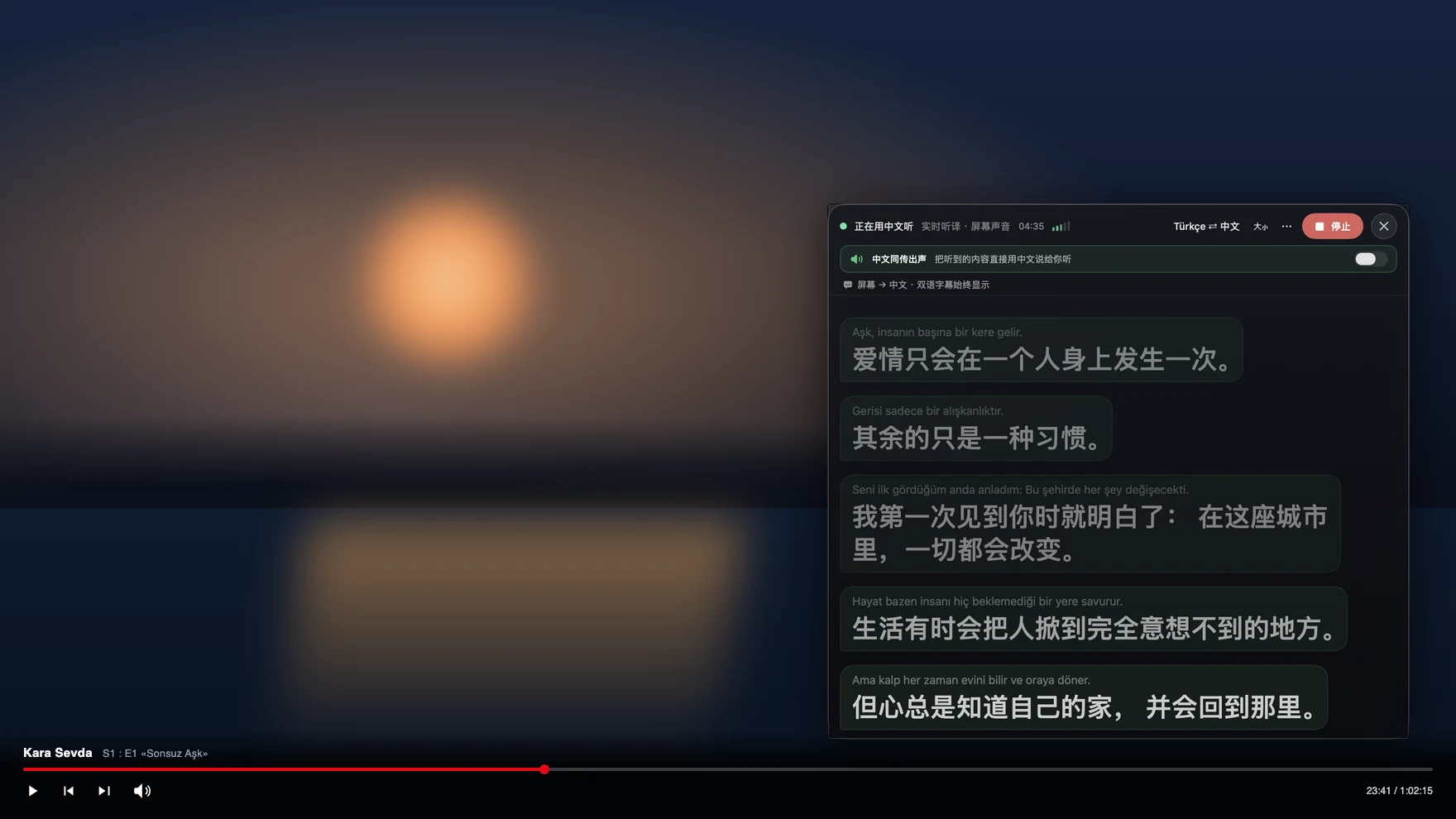
Press Start, play it, and the subtitles appear as it is spoken — original, translated or both. Turkish series travel far ahead of their subtitles: an episode airs, the fan-subbed version lands days later, and the YouTube upload has no English track at all. Add a supplier in Istanbul, a property agent in Antalya, or a spouse’s family who speak no English, and Turkish becomes something you need live. Tingdong listens to whatever your Mac plays, detects Turkish by itself, and floats English captions over it while the sentence is still being spoken.
How to set it up
- 1Open Tingdong and choose “Live Listen”
Set the source to “Screen sound” so it captions the episode or the meeting rather than the room. You do not pick Turkish — it is detected.
- 2Press Start
Captions float over the player or the call window: the Turkish line on top, English below, updating mid-sentence. The translation can be read aloud to you instead.
- 3For a call, switch to “Call Translation”
Choose Tingdong Microphone (Website version) in the mic menu of FaceTime, Zoom, WhatsApp for Mac or Telegram, or hand an iPhone call to the Mac over Bluetooth. You speak English, they hear Turkish.
One Turkish word can be a whole English clause
Turkish builds meaning by stacking suffixes onto a stem, so a single spoken word can carry the subject, the tense, a negation, a question and a report of who said it — and the verb that governs everything lands at the end of the sentence. A translator that works line by line, with no memory of what came before, has to commit before the decisive suffixes arrive, which is where auto-translated subtitles turn into word salad. Tingdong translates a continuous stream of speech and keeps context across sentences, so dialogue in a long episode stays readable. Language is detected per phrase among 60+ inputs, which matters in business speech that keeps borrowing English terms, and the Turkish line stays above the translation so a name or a phrase can be checked against what was actually said.
Frequently asked questions
Can I watch a new dizi episode before English subtitles exist?
Yes — that is the usual reason people install it. Captions come from the audio, not from a subtitle track, so a broadcast, a YouTube upload or a stream with no subtitles at all is captioned the same way.
Does it work on Netflix and other protected players?
Yes. Only the audio your Mac already plays is used, so screen-capture protection is never triggered and the video keeps playing normally. The same applies to Disney+, Prime Video and YouTube.
Can I call a supplier or an agent in Turkey?
Yes. Hand the iPhone call to your Mac over Bluetooth, or choose Tingdong Microphone (Website version) in a desktop calling app. They hear your voice plus a Turkish translated voice and install nothing, while you read their replies as English captions.
How well does it handle fast, informal speech?
Dialogue and meeting speech translate well because context is carried across sentences. Rapid comedy, songs and strong regional accents are hard for any machine translation, and the original line is always visible above the English.
Do I need to set the source language to Turkish?
No. Turkish is auto-detected among 60+ input languages, per phrase, so a family call that mixes Turkish and English is captioned without any setup.
Try it on your next video, meeting or callTry it at your next meeting or lecture
Download free for macOS Get it for Windows

Free trial: about 100 minutes of subtitles · No signup or card
Free trial · No account or card
Windows 11 (subtitles and Read aloud only, nothing sent into calls)